Issues
An issue holds one piece of work's context, assignee, status, and execution history.
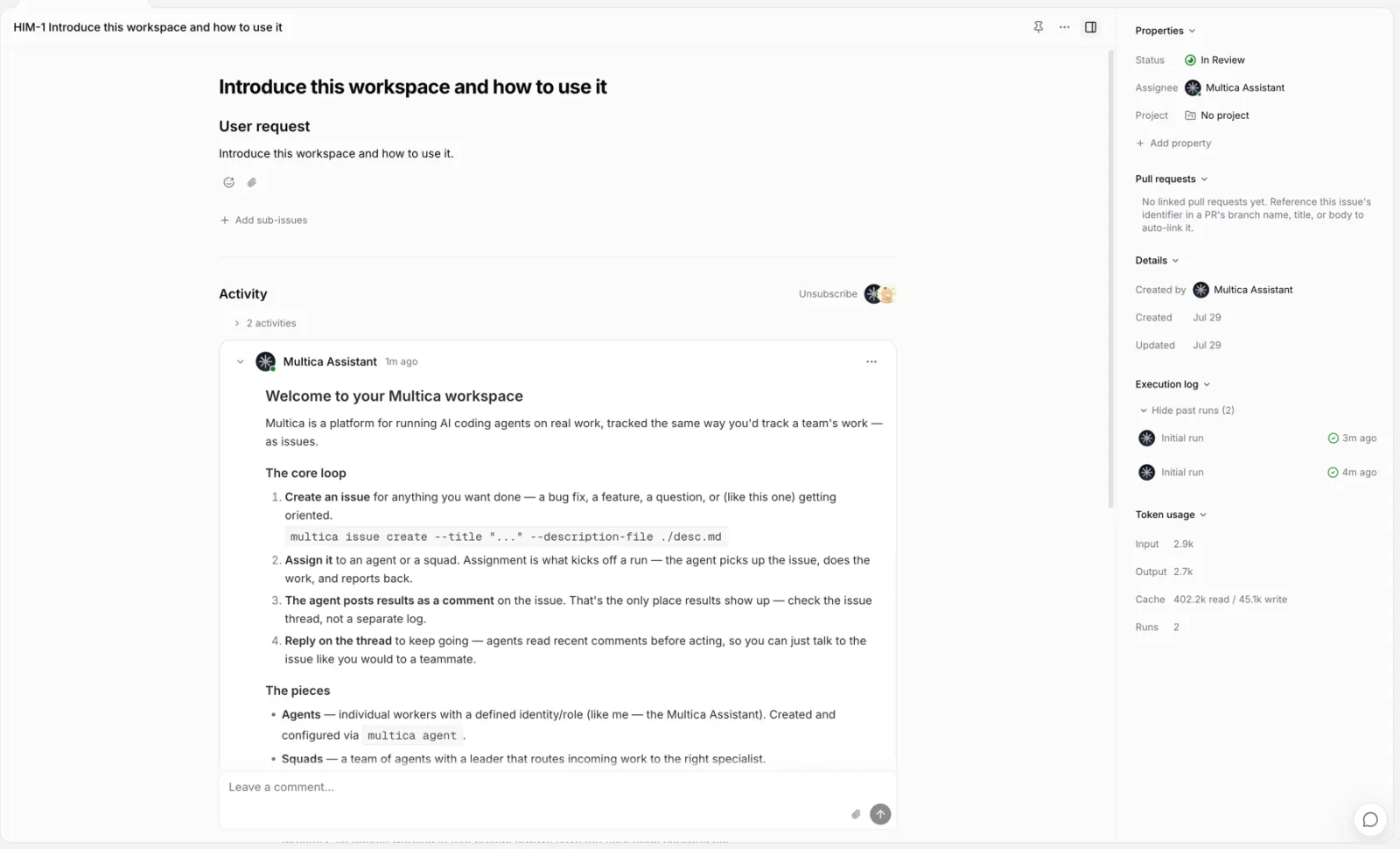
An issue is Multica's basic unit for organizing work: a feature, a bug, an investigation — anything a member or an agent should own and drive forward. The discussion, status changes, and every run are recorded on the issue, so nobody has to dig through chat logs or terminal output for context.
Parts of an issue
| Part | Purpose |
|---|---|
| Title and description | Goal, background, requirements, and acceptance criteria. |
| Status and priority | Where the work stands and what to handle first. |
| Assignee | A workspace member, an agent, or a squad. |
| Dates, labels, and custom properties | Planning, categorization, and your team's own fields. |
| Project and parent-child relationships | Fits into a larger body of work, or splits into sub-issues. |
| Activity and execution log | Comments, status changes, runs, and results returned by agents. |
| Deliverables | Files uploaded in comments, with re-uploads of the same file kept as versions. |
Create an issue
Create one from the Issues page or inside a project. New Issue in the sidebar, or C, opens the create dialog in the mode you used last: Create manually has you fill in the title and properties yourself (a title is enough, the rest can come later), while Create with agent only needs a description of the request. Switch modes at the bottom of the dialog; what you have filled in carries over.
Each issue has a number, such as MUL-123. The digits increment within the workspace; after an admin changes the workspace's issue prefix, numbers display with the new prefix. See Workspaces.
Create with agent
Describe the work, pick an agent or squad under Created by, and click Create. The dialog closes right away. The agent works in the background, turns the request into a title and description, and creates the issue; success or failure lands in your inbox. A failure notification has Edit as advanced form, which puts your original request into the manual form.
Team dinner next Wednesday. Book a restaurant for 12 people, under $40 a head, close to the office, a private room if possible.
- The agent restates your request faithfully and does not add requirements or acceptance criteria you did not give.
- If the request names an assignee ("give this to Lei Li"), the agent assigns them. Otherwise the assignee is whoever you picked under Created by: the agent itself, or the squad if you picked one. New issues start in
todo, so when the assignee is an agent, it starts working on the issue as soon as it exists. - The project, priority, and due date you set in the dialog are used as-is; the agent does not infer different ones from the text. Project shows by default, and priority and due date are under the ⋯ menu. Choose which fields always show in Settings → Preferences → Fields shown when creating issues.
- With Create another on, the dialog stays open after each submission so you can write the next one.
- Created by lists only the agents and squads you are allowed to assign. If the agent's runtime has a multica CLI that is too old, the dialog asks you to upgrade the daemon or switch to manual create.
Choose an assignee
| Assignee | Effect |
|---|---|
| Member | That member owns the follow-up; no run is created. |
| Agent | A run is created for that agent. |
| Squad | The squad leader receives it and decides who handles it. |
When assigned to an agent or a squad, the issue enqueues immediately unless it is in backlog; if the runtime is offline, the run waits in the queue. Archived agents and squads cannot be assigned.
Assignment does not bypass an agent's Access; when assigning to a squad, the leader's Access is what gets checked. See Assign issues to agents.
Status
Every workspace starts with seven built-in statuses, grouped into four lifecycle categories.
| Category | Built-in statuses | Meaning |
|---|---|---|
unstarted | backlog, todo | Work that has not started, whether planned or deferred. |
started | in_progress, in_review, blocked | Work has started, is awaiting review, or cannot continue for now. |
done | done | Successfully finished; terminal. |
closed | cancelled | No longer pursued; terminal, not successful completion. |
Categories only tell you which part of the lifecycle an issue is in. Boards, lists, filters, and sorting work from the individual status, and the special behavior agents and automations rely on is attached to individual statuses too.
The demo below starts from an issue already assigned to an agent and parked in backlog:
- Unstarted
unstartedBacklogTodo - Started
startedIn ProgressIn ReviewBlocked - Done
doneDone - Closed
closedCancelled
- Status
- Assignee
- Ops helper
backlog· UnstartedParked. Assigning an issue here never starts an agent run.
Ops helper is already the assignee, but it waits while the issue is here.
Members and agents can change statuses directly. In a project with a workflow, choose from that workflow’s steps. Moving into a step with a handoff can also change the assignee and ask an agent to start work.
Agents update the issue’s status as work progresses: by default they set in_progress when they begin and in_review when they deliver. When a project has a workflow, they follow its steps and handoff instructions instead.
Two changes are made by the system:
- When a run fails, the issue has no other runs, and no retry is triggered,
in_progressrolls back totodo. - When every PR linked to the issue is merged, the issue moves to the status the workspace chose (
doneby default) — unless the workspace leaves status alone or the issue is switched off. See GitHub integration.
Custom statuses
A workspace owner or admin can add statuses such as Code Review, QA, or Rework. If Settings includes Workflows, manage them in the status library below it. If not, use Settings → Issue Statuses.
When you create one, pick its category — Unstarted, Started, Done, or Closed. The category cannot be changed later. A custom status does not automatically gain the special behavior of a built-in status: for example, naming one “Waiting” does not pause an agent.
- Built-in statuses cannot be renamed, recolored, or archived.
- Custom status names appear as you entered them. Changing a name or color updates it wherever that status is used.
- Before archiving a status, move all issues using it to another suitable status, including completed or cancelled issues. Remove it from any custom workflows too. Archiving then removes it from future choices.
The status library holds the available statuses. A project’s workflow chooses which ones its issues use and in what order.
Custom properties
Fields specific to your team, such as severity, customer, or budget, are custom properties. A workspace owner or admin manages them in Settings → Properties; a workspace can have up to 20 active properties.
The types are text, number, select, multi-select, date, checkbox, URL, member, members, text list, and URL list. The type cannot be changed after creation. Properties can be used in filters; boards can also be grouped by a select property, and number and date properties can be used for sorting.
Archive a property you no longer use: it disappears from pickers and filters, the values already on issues stay, and you can restore it later.
Issues and runs
An issue is the persistent record of a piece of work; a run is one concrete run by an agent. One issue can produce several runs over time — a first implementation, follow-up changes, another check. A completed run only means that run ended, and an agent answering a question does not mean the issue's work has been delivered; whether the issue is finished is determined by the issue's status.
Deliverables
Files that members and agents upload in comments are collected in the Deliverables section of the issue sidebar. It lists the latest 3 images and 4 other files; View all opens every deliverable grouped by the comment that posted it, with filters for images, documents, videos, and other files. G in the file viewer opens the same page. Attachments on the issue description are inputs, so they do not count.
Uploading a file again with the same name and type adds a new version of the same deliverable. The section lists it once with its version (for example v2), and each file card in the comments shows which version it is. In the viewer, click the version number to switch to an older one, and Show in comments to jump to the comment that uploaded it.
Projects and sub-issues
An issue belongs to at most one project; the project provides shared instructions and resources for runs inside it. Moving an issue to another project does not create a copy.
Larger work can be split into sub-issues: the parent issue keeps the overall goal while sub-issues progress independently. Parent and child statuses do not affect each other.
Sub-issues can be given a stage to advance in batches — 1, 2, 3. When every sub-issue in the earliest unfinished stage reaches done or cancelled, the parent issue receives a "sub-issues completed" notification; when the parent's assignee is an agent, it wakes up and decides whether to start the next stage. Sub-issues without a stage count as one batch and notify once when they all finish. The system triggers this wakeup; see Issue wakeups for its rules and the other kinds of wakeup.
Views and display settings
The Issues page offers five layouts — list, board, table, Gantt, and swimlane — filterable by status, assignee, project, and other properties. They all show the same issues.
The Display menu adjusts the current layout. Boards group by status, assignee, project, or a select property, and swimlanes by parent issue, project, or assignee. You can also set the ordering, whether sub-issues show, which properties appear on cards, and which board columns show (columns are locked while a status filter is active).
Save a view
Save a combination of filters and display settings you use often as a view: click the Views button next to the view bar, choose New view, and give it a name and visibility.
| Visibility | Who sees it | Who can edit and delete it |
|---|---|---|
| Only visible to me | Only you | You |
| Visible to workspace members | Every workspace member | You, plus workspace owner and admin |
The display settings saved in a view are its Default display: members see the view that way the first time they open it, then adjust it for themselves without affecting anyone else. A view lives on the page it was created on: one created in a project belongs to that project, and views created in My Issues are always private.
Drag views in the view bar to reorder them; ordering and visibility in Manage views affect only you. Right-click a view to edit it, delete it, or Pin to sidebar.
Side preview
Clicking an issue card or row opens the full page by default. Switch to Side preview in Settings → Preferences → Opening issues and issues open in a panel on the right of the page, with the page header and toolbar still usable. Either way, Shift+Click opens the other one. The setting applies to the current device only.
While the preview is open, J / K move to the next or previous issue, H / L move between adjacent board columns, and Esc closes it. Open full page takes you to the issue page.
Batch edits
Select several issues in a list, a table, or a sub-issue list, and a batch toolbar appears at the bottom to change status, priority, or assignee, or delete them all at once. In a table, Shift-click selects a range.
- When the selection spans several projects, the status menu offers only statuses every selected issue's workflow allows. An issue that does not support a change keeps its value, and the rest are updated.
- Batch status changes apply directly. Agent-assigned issues that leave
backlogstart running as usual. - Batch-assigning to an agent or squad first asks you to confirm the runs that will start; if every selected issue is in
backlog, the assignment applies directly.
Mark as duplicate
When the same thing was filed twice, open the extra issue and choose Mark as duplicate from the status menu or from Relations in the issue actions menu, then pick the original. The picker suggests issues with a similar title and issues you viewed recently.
The issue moves to cancelled and remembers its original:
- A Duplicate of banner above the title links to the original and shows its current status. In lists, boards, and tables, an arrow with the original's number appears next to the issue.
- The original's sidebar gains a Duplicates section listing the issues marked as its duplicates and who created them.
- To undo a mistake, click Not a duplicate on the banner; the issue goes back to
todo. Changing the status to anything other thancancelledalso removes the mark.
The relation is one level deep: an issue that is itself a duplicate cannot be an original, and an issue that already has duplicates cannot be marked as a duplicate. If a project's workflow has no cancelled, the issue actions menu does not offer it.
Delete an issue
Any workspace member can delete an issue.
Deletion cannot be undone: the issue with its comments, attachments, and linked records is permanently removed, and unfinished runs are cancelled. When the work is simply no longer pursued, set the status to cancelled instead — the discussion and results stay available.
Next steps
- Projects — organize work that takes multiple issues to finish.
- Comments — discuss, reply, and @mention around an issue.
- Assign issues to agents — hand work to an agent and start the first run.
- Runs — learn about queuing, running, retries, and cancellation.